Internet Marketing System Audio Message Setup
What is the Theory of the Scrolling Text?
The Audio message is often referred to a Sizzle Call. There are many people who prefer to be educated or have information shared by audio format vs. having to read. The Audio message helps to drive your main parts home and works in conjunction with the Scrolling Text for those who do not have speakers.
We do not use Video or Flash for 2 reasons.
The first reason is it has been proven over and over that simple is better from the prospects point of view. Video and flash is more appropriate for the step that would naturally follow the use of an Internet Marketing System.
The second reason is to keep the Internet Marketing Software pricing down. If you would prefer to use Video or Flash email us at info@internetnextstep.com and we will work out custom pricing for your system.
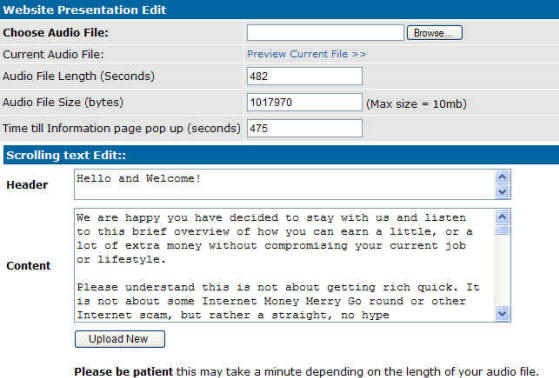
If you have your audio file created already, you simply use the Choose Audio File blank on the Site Presentation Link in your system which can be found in the Website Setup area.
Select Browse, find your file, then use the Upload New button at the bottom of the Scrolling text section to upload.
In order to record your audio message, here are a few hints.
Make sure the room you record it in is SUPER QUIET! The less background noise you have, the smaller your final file will be. Of course those who have the luxury of a recording studio, will have the best quality files!
Refrain from putting background music on as that will literally double the size of your file. simple audio is the best as you have a 10 meg limit to size of your audio.
Normally after recording, you will have a Raw wave file, you will need to shrink it down with compression options. Keep trying various configurations of the sound file until the quality is just starting to degrade and become slightly "tinny". At that point you have reached maximum compressoin.
There is a great FREE recording software tool out there Called Audacity. Once you have this, all you will need is a microphone and a quiet room to record your audio.
http://audacity.sourceforge.net/

